Get your Audi Radio Code Instantly by providing the serial number.
Instant Audi Radio Codes
Radio Code Found!
Receiving Time:
Enter Your Serial Number
AUZ2Z3F4081657
014AUZ2Z3T4684864
Safe • Instant • Accurate
Instant : Delivery
How To Get Your Audi Radio Code
All of Our Audi radio code requests are instantly available, and display on screen after purchase

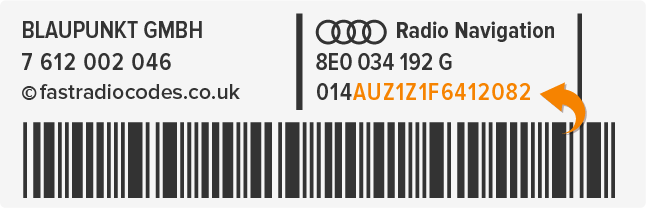
How To Find Your Serial Number?
1. Review the owner's manual: The serial number might be listed in the owner's manual of your Audi vehicle.
2. Examine the radio unit: Often, the serial number is located on a sticker or label on the radio unit itself. You may need to remove the radio from the dashboard to access it.
3. Contact the dealership: Reach out to your Audi dealership and provide them with your vehicle identification number (VIN). They should be able to look up the serial number for you.
4. Utilize software tools: There are various online software tools available that can assist you in extracting the serial number from the radio unit using a connected computer or smartphone.
Once you obtain the serial number, you can use it to obtain the radio code, which may be necessary if your radio becomes locked due to a power loss or battery replacement.

1. Turn on the ignition switch without starting the engine.
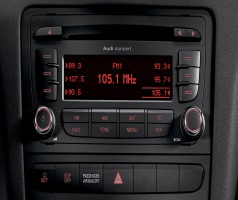
2. The radio should display "SAFE" or "CODE." Press and hold down the "P.SCAN" and "RDS" buttons simultaneously until "1000" appears on the display.
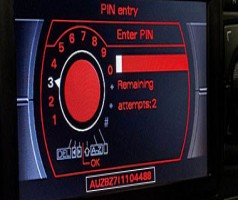
3. Release the buttons once "1000" appears. Use the radio station preset buttons to input the four-digit radio code. Each button corresponds to a digit of the code.
4. Once you have entered the correct code, press and hold down the "P.SCAN" and "RDS" buttons again until the word "SAFE" disappears from the display and the radio unlocks.
5. Your Audi radio should now be unlocked and ready to use.
If you don't have the radio code, you'll need to obtain it from your Audi dealer or through Audi's official website using your vehicle identification number (VIN).
Discover Our Most Popular Audi Radio Code Requests
Unlock your Audi radio effortlessly with our top-requested codes.

Unlock Code

Unlock Code

Unlock Code

Unlock Code
Unlock Code
Unlock Code
Free Radio Code Retrieval
If you ever lose or misplace your stereo code theres no need to worry! Once you purchase from us you can retrieve you radio code at whenever needed again.
24/7 Code Requests for All Cars, Makes & Year Models
Recover your original radio unlock code online in most cases Instantly
Save Time & Money From Visiting Main Dealership
Up To 75% Cheaper than Main Dealer Charges
Guaranteed Working Official Original Code Suppliers
All Our Radio Codes are Guaranteed to Work First Try.
Need Help? 24h Customer Service Support Available
Please Visit Us Via Chat Email or Phone Mon - Sun 7am to 9pm
Secure Fast & Easy 3 Step Radio Unlocking Process
Secure 512-bit Safe Payments Powered By Stripe