Get your Nissan Note Radio Code Instantly Online by providing the serial number
Instant Nissan Note Radio Codes
Radio Code Found!
Receiving Time:
Enter Your Serial Number
BP538761132843
9596739
CL0818A0088368
PP3000MB0003742
PN3001PA0014571
DS1AN0353905BH30D
DW4BN0597412BH30D
Instant • Secure • Accurate
Receive Your Code : Instant Delivery
How To Get Your Nissan Note Radio Code
All of Our Nissan Note radio code requests are instantly available, and display on screen after purchase

How To Find Your Nissan Note Radio Code?
Nissan Note Connect Radio
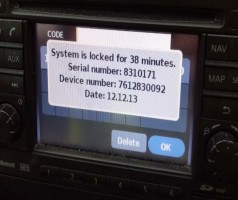
To get a Radio Code on Nissan Connect Bosch LCN EU system models, the serial number can be found located on radio's display, turn on your Car ignition to ACC Position, starting your car engine is Not required.
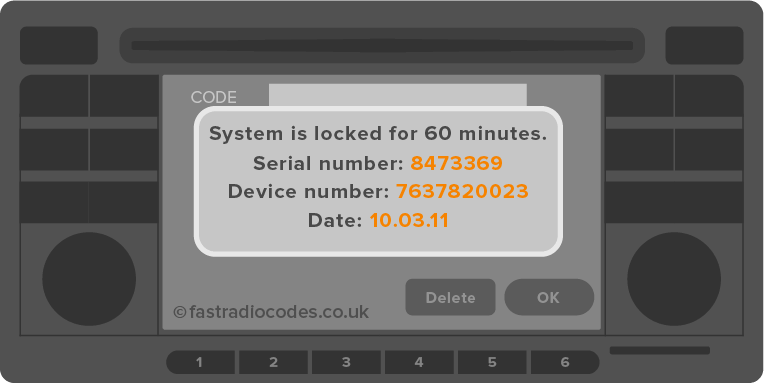
Once you see Radio Code 0 0 0 0 on the radio's display, enter a random radio code up to THREE times. for Example: 0 0 0 0 Your SYSTEM is LOCKED for 60 minutes, will be displayed, with the Serial Number, Device Number & Date
Nissan Note Serial Display Code:
Serial Code: 1685758
Part Code: 7645358316
Date Code: 13.01.16
Make a Note of all 3 codes, as will be required when entering your details, to get your Nissan Note radio unlock code from our online service.

Nissan Note Daewoo Radio
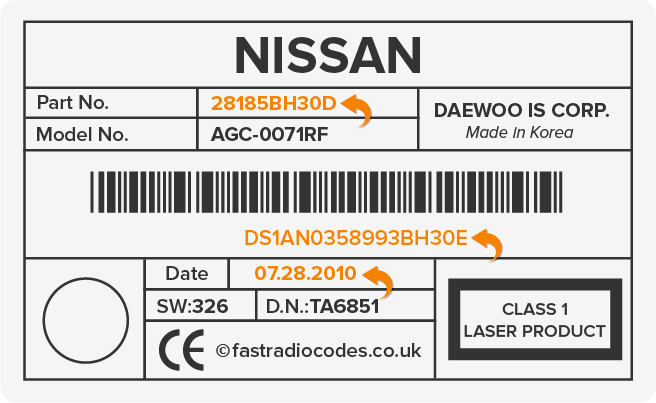
Nissan Daewoo serial numbers are located on the rear of your radio, the radio MUST be removed to view serial number label code, your serial will begin with the following code formats, DW or DS followed by 15 digit alphanumeric code. Additional information is required on Nissan Daewoo radio code processing, onscreen help instructions available.
Nissan Daewoo Serial Code Label
DW Type Code: DW37N0266573BH30D
DS Type Code: DS37N0267903BH30D
Daewoo Part Code: 28185BH30D
Date Code: 07.28.2010
Nissan Note Clarion Radio
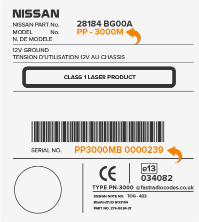
Nissan Clarion serial numbers are located on the back of your radio, your Nissan radio must be removed, to be able to view your serial number, Nissan Clarion serials begin with CL, PN, or PP followed by 12 digit code.
Nissan Clarion Serial Code Label:
CL Type Code: CL380030293000
PN Type Code PN2392MB1002232
PP Type Code PP3000MB0000239
Nissan Note Blaupunkt Radio
To get a Radio Code on Blaupunkt & K12 radio system models, the serial number can be found located on the radio's label, begin with "BP" followed by 12 characters, the Part Number of your Radio is also required to unlock your radio, it will begin with 76 followed by 8 numerical digits.
Nissan Blaupunkt Serial Code Label:
BP Type Code: BP375758484285
Blaupunkt Part Code: 7645358316

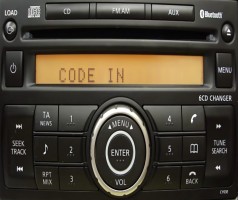
• To Enter your Nissan Note radio code Switch on your Nissan radio 'CODE IN' should display on the radio's screen
• Press button 1 until the correct digit of the code is displayed.
• Press button 2 until the correct digit of the code is displayed.
• Press button 3 until the correct digit of the code is displayed.
• Press button 4 until the correct digit of the code is displayed.
• To input your Nissan Note Radio Code you need to press and hold one of the following: 6, TA or the seek button for 10-15 seconds
• Helpful Information
• 3 attempts is a 1 hour wait
• 6 attempts is a 12 hour wait
• 9 attempts is a 24 hour wait
• If you enter your code 10 times, your radio will lock, forcing you to go to a dealer to get it unlocked.
• Free Nissan Micra Radio Code instructions are also sent after purchase
Nissan Systems Covered
Absolutely no need to get a Radio Decoding Company to decode the radio
PP-242 • PN-3000 • PN-3001 • PP-3000
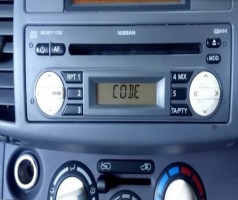
Blaupunkt MMR • BP

AGC-0071RF • AGC-0070RF
Bosch • LCN EU • Satnav
Free Radio Code Retrieval
If you ever lose or misplace your stereo code theres no need to worry! Once you purchase from us you can retrieve you radio code at whenever needed again.
24/7 Code Requests for All Cars, Makes & Year Models
Recover your original radio unlock code online in most cases Instantly
Save Time & Money From Visiting Main Dealership
Up To 75% Cheaper than Main Dealer Charges
Guaranteed Working Official Original Code Suppliers
All Our Radio Codes are Guaranteed to Work First Try.
Need Help? 24h Customer Service Support Available
Please Visit Us Via Chat Email or Phone Mon - Sun 7am to 9pm
Secure Fast & Easy 3 Step Radio Unlocking Process
Secure 512-bit Safe Payments Powered By Stripe